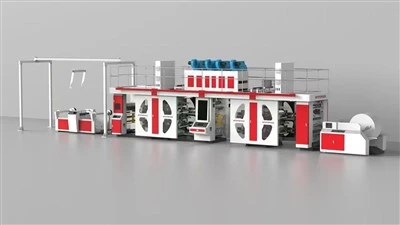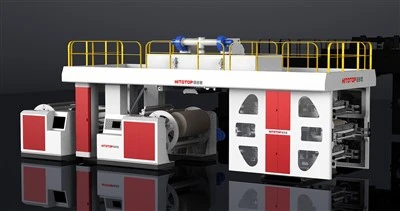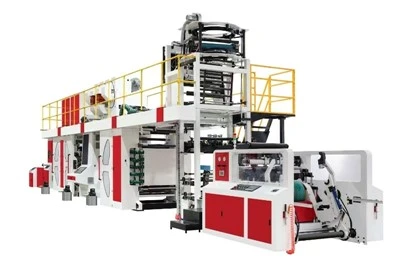


Hey there! As a supplier of the 6 Colour Flexo Printing Machine, I've seen firsthand how setting up the right printing parameters can make or break your print jobs. In this blog, I'll walk you through the process of setting up the printing parameters for a 6 - colour flexo printing machine, sharing some tips and tricks along the way.
Understanding the Basics of Flexo Printing
First off, let's quickly go over what flexo printing is. Flexography is a form of relief printing that uses a flexible relief plate made of rubber or photopolymer. The ink is transferred from an anilox roller to the plate, and then from the plate to the substrate. It's a versatile printing method that can be used on a wide range of materials, including paper, cardboard, plastic films, and more.


If you're interested in different types of flexo printing machines, you can check out our Flexo Digital Printing Machine, Stack Flexo Press, High Speed Flexo Printer, and CI Flexo Printing Press.
Pre - Setup Checks
Before you start setting up the printing parameters, you need to make sure your machine is in top - notch condition. Here are some key pre - setup checks:
Machine Inspection
- Check all the mechanical parts of the 6 - colour flexo printing machine. Look for any signs of wear and tear on the rollers, gears, and belts. Make sure the bearings are well - lubricated and there are no loose parts.
- Inspect the printing plates. They should be clean, free of any scratches or damage. If the plates are dirty, use a suitable plate cleaner.
- Examine the ink systems. Ensure that the ink tanks are clean and there are no blockages in the ink lines. The anilox rollers should also be in good condition, with the correct cell volume for your printing job.
Substrate Preparation
- The quality of your substrate matters a lot. Check the substrate for any defects such as wrinkles, holes, or uneven thickness.
- Different substrates have different surface properties. Some may require pre - treatment, like corona treatment for plastic films, to improve ink adhesion.
Setting the Printing Parameters
Ink Viscosity
Ink viscosity is crucial for getting good print quality. If the ink is too thick, it may not transfer properly from the anilox roller to the plate and then to the substrate. On the other hand, if it's too thin, it can cause bleeding and poor definition.
- Use a viscometer to measure the ink viscosity regularly. You can adjust the viscosity by adding either thinner or a thickening agent, depending on the reading.
- The ideal viscosity can vary depending on the type of ink, substrate, and printing speed. For most jobs, a viscosity in the range of 20 - 30 seconds (measured with a Zahn cup #2) is a good starting point.
Printing Pressure
The right printing pressure ensures that the ink is transferred evenly from the plate to the substrate.
- Adjust the printing pressure gradually. Start with a light pressure and then increase it in small increments while checking the print quality.
- You can use a pressure - sensitive paper to check the pressure distribution across the printing plate. The goal is to have a uniform pressure so that all parts of the image are printed clearly.
Anilox Roller Selection
The anilox roller plays a vital role in metering the amount of ink that is transferred to the plate.
- The cell volume of the anilox roller should be chosen according to the type of job. For fine - line printing and high - resolution images, a roller with a smaller cell volume is preferred. For solid - colour printing and jobs that require a higher ink laydown, a roller with a larger cell volume is better.
- Make sure the anilox roller is properly cleaned. Any ink buildup in the cells can affect the ink transfer and print quality.
Registration
Registration is all about aligning the different colours accurately on the substrate.
- Most 6 - colour flexo printing machines are equipped with a registration system. Use the machine's controls to adjust the horizontal and vertical position of each printing unit until all the colours are perfectly aligned.
- You can use registration marks on the substrate to check the alignment. If there are any misalignments, make the necessary adjustments using the registration controls.
Drying Parameters
Proper drying is essential to prevent smudging and to ensure that the ink adheres well to the substrate.
- Adjust the temperature and air volume of the drying system according to the type of ink and substrate. Solvent - based inks usually require higher drying temperatures compared to water - based inks.
- The drying speed should be coordinated with the printing speed. If the drying is too slow, the ink may not dry completely, and if it's too fast, it can cause problems like curling of the substrate.
Color Management
In a 6 - colour flexo printing machine, color management is a key aspect.
Color Matching
- Before starting the print job, make a color proof. Compare the proof with the customer's color sample. Use color - matching software or a spectrophotometer to measure and adjust the colors.
- Each color unit should be adjusted separately to achieve the desired color. You may need to change the ink formula or the ink volume to get an accurate match.
Color Consistency
- Throughout the printing process, monitor the color consistency. Use a color bar on the substrate to check the color density and hue regularly.
- If there are any color variations, make the necessary adjustments to the ink flow or the printing pressure in the corresponding color unit.
Troubleshooting Common Issues
Even with proper setup, you may encounter some common issues during printing.
Ink Spots and Streaks
- If you notice ink spots, it could be due to dirty anilox rollers or printing plates. Clean the rollers and plates thoroughly.
- Streaks can be caused by uneven ink distribution or a damaged anilox roller. Check the ink flow and replace the anilox roller if necessary.
Poor Ink Adhesion
- As mentioned earlier, substrate pre - treatment may be required. If the ink is not adhering well, check if the substrate needs corona treatment.
- Also, make sure the ink is compatible with the substrate. Using the wrong type of ink can lead to poor adhesion.
Conclusion
Setting up the printing parameters for a 6 - colour flexo printing machine is a multi - step process that requires attention to detail. By following the steps outlined in this blog, you can achieve high - quality prints consistently.
If you're in the market for a 6 Colour Flexo Printing Machine, we're here to help. We offer top - of - the - line machines and can provide you with all the support you need to get the most out of your investment. Whether you're a small - scale printer or a large - scale production facility, our machines are designed to meet your needs.
If you have any questions or want to discuss your printing requirements further, don't hesitate to reach out. We're always happy to have a chat and help you find the best solutions for your business.
References
- "Flexographic Printing Technology Handbook"
- Various industry - specific research papers on flexo printing optimization.